KDP Interior - Food Tracker: Streamlining Low Content Book Creation
For publishers and creators operating within the Amazon Kindle Direct Publishing ecosystem, efficiency is often the differentiator between a stagnant portfolio and a profitable business. The KDP Interior - Food Tracker serves as a foundational asset in this workflow, specifically designed to eliminate the most time-consuming phase of low content book creation: interior formatting. This ready-to-use PDF file provides a structured, 100-page layout that allows entrepreneurs, freelancers, and health-focused authors to bypass technical design hurdles and focus on market positioning and cover aesthetics. Rather than spending hours adjusting margins or creating tables in design software, users can integrate this pre-formatted interior directly into their publishing pipeline.
This digital asset fits into the broader process of Print on Demand (POD) publishing as a standardized production component. In a typical workflow, creators often struggle with the technical specifications required by Amazon’s printing partners. Bleed settings, safe zones, and gutter margins are frequent points of failure that lead to rejected manuscripts or poor customer experiences. By utilizing a pre-validated KDP Interior - Food Tracker, publishers secure a baseline of quality assurance. The file acts as a reliable template that ensures every page aligns correctly with the 6″ x 9″ trim size, allowing the creator to shift their mental energy from technical troubleshooting to strategic product development.
Technical Specifications and Workflow Integration
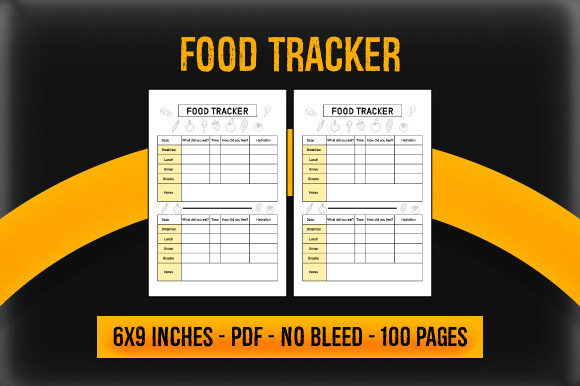
Understanding the technical parameters of this asset is essential for seamless integration into your KDP dashboard. The included high-resolution PDF files are engineered for the 6″ x 9″ dimension, which remains one of the most popular and versatile sizes for journals and trackers. This size offers sufficient writing space for detailed meal logging while remaining portable enough for daily carry. When incorporating this interior into your project, you must first determine whether your cover design requires bleed or no bleed settings. The provided files accommodate both scenarios, but selecting the correct version during the upload process is critical to preventing white borders or cropped content.
The 100-page count is strategically chosen to balance perceived value with printing costs. For a food tracker, this length typically supports three to four months of daily logging, depending on the specific layout density. From a business perspective, this page count sits in an optimal royalty bracket for paperback books. Publishers should verify the current printing cost against their target retail price before finalizing the listing. Because the interior is a static PDF, it integrates universally with any cover creation tool. Whether you use Canva, Adobe InDesign, Affinity Publisher, or specialized KDP cover calculators, the interior file remains independent. This decoupling allows you to test multiple cover designs against the same interior, facilitating A/B testing without reformatting the manuscript.
Strategic Application Across User Segments
The utility of a food tracker interior extends beyond simple calorie counting, making it a versatile asset for various niches. Health professionals, nutritionists, and fitness coaches can use this ready-to-use PDF as a branded resource for clients. Instead of directing clients to generic apps, these professionals can publish a physical companion journal that reinforces their methodology. In this context, the KDP Interior - Food Tracker functions as a tangible extension of a service-based business. The consistent structure helps clients build habits, while the physical act of writing enhances mindfulness regarding dietary choices.
For educators and wellness bloggers, this interior supports content monetization strategies. If you produce content around intuitive eating, macro tracking, or allergy management, a physical journal serves as a high-value lead magnet or upsell. The pre-formatted pages provide immediate utility to your audience without requiring you to become a layout designer. Similarly, productivity-minded users and freelancers who manage their own health alongside busy schedules benefit from the simplified structure. The tracker removes decision fatigue; users do not need to decide what to track each day because the framework is already established. This consistency is key to long-term adherence and positive user reviews.
Pre-Publication Quality Control and Customization
While the KDP Interior - Food Tracker is ready to use, successful publishers treat it as a starting point rather than a final destination. Before uploading, it is advisable to download the physical proof or order a printed copy. Digital previews cannot replicate the tactile experience of writing in a journal. Check the gutter margin to ensure that binding does not obscure writing areas. Verify that the paper weight and opacity meet your standards for the type of pens your target audience might use. Although the PDF is high resolution, the uncoated paper standard for KDP journals can sometimes affect ink absorption. Ordering a proof allows you to validate the user experience firsthand.
Customization within the constraints of a pre-made PDF involves strategic metadata and cover alignment. Since you cannot alter the interior pages without breaking the format, your cover and book description must accurately reflect the internal structure. If the tracker includes specific sections for water intake, macronutrients, or mood logging, these features must be highlighted in your marketing materials. Misalignment between customer expectations and the actual interior is the primary cause of negative feedback in the low content category. Use the "Look Inside" feature effectively by ensuring your cover thumbnail clearly communicates the specific style of tracking included in the 100 pages.
Optimizing for Long-Term Portfolio Growth
Integrating this food tracker into a larger publishing strategy requires thinking about series potential and cross-promotion. A single food tracker is a standalone product, but it gains momentum when paired with complementary interiors. Consider how this asset interacts with other planners, fitness logs, or wellness journals in your catalog. Consistent branding across different interiors builds recognition. Even though the internal layouts differ, maintaining a cohesive visual identity on the covers signals to customers that they are purchasing from a trusted source. The 6″ x 9″ format facilitates this uniformity, allowing you to create a visually appealing brand shelf on Amazon.
Efficiency in this business model comes from batching tasks. With a ready-to-use PDF, you can prepare multiple variations of a food tracker in a single session. Create distinct covers targeting different demographics—such as postpartum nutrition, athletic performance, or diabetic management—all using the same validated interior file. This approach maximizes the return on investment for the asset. It also allows for rapid response to seasonal trends. When January approaches and health resolutions peak, having pre-vetted interiors ready for new cover designs enables you to capitalize on search volume faster than competitors designing from scratch.
Practical Implementation Tips for Publishers
To maximize the effectiveness of the KDP Interior - Food Tracker, adhere to the following implementation guidelines:
- File Management: Maintain organized folders distinguishing between bleed and no-bleed versions. Clearly label files with dimensions and page counts to prevent upload errors during high-volume publishing sessions.
- Cover Compatibility: Always generate your cover template based on the exact page count of the PDF. Even a one-page discrepancy will result in spine misalignment. Use the official KDP calculator for the specific paper type selected.
- Keyword Alignment: Analyze the specific fields included in the tracker. If the interior tracks protein specifically, include "protein tracker" in your backend keywords. Generic terms like "food journal" are highly competitive; specific feature-based keywords improve discoverability.
- User Instruction: Consider adding a title page or introduction if the PDF allows, or utilize the first page of the description to explain how to best use the tracker. Clear guidance reduces returns and improves satisfaction.
- Review Monitoring: Pay close attention to feedback regarding the layout. If users consistently mention that a specific column is too narrow or a section is missing, use this data to inform future custom interior projects or to select different ready-to-use assets.
The KDP Interior - Food Tracker represents a convergence of convenience and professional standards in self-publishing. By handling the complex geometry of book formatting, it liberates creators to focus on the aspects of the business that drive growth: niche research, compelling design, and effective marketing. Whether used as a standalone revenue stream, a client resource, or part of a comprehensive wellness brand, this asset streamlines the path from concept to published product. Success in the low content space is rarely about reinventing the wheel; it is about assembling reliable components efficiently and presenting them to the right audience with clarity and professionalism.