Homebrewing Journal: A Practical Guide to Ready-to-Use KDP Interiors
The craft beer renaissance has inspired countless enthusiasts to move from consumers to creators, and for many, documenting that journey is just as important as the brewing itself. A dedicated Homebrewing Journal serves as the essential laboratory notebook for this culinary art form, capturing recipes, fermentation data, tasting notes, and process adjustments. For entrepreneurs and self-publishers looking to serve this passionate niche through Amazon Kindle Direct Publishing (KDP) or Print on Demand (POD), offering a high-quality, ready-to-use interior file is a strategic business move. However, simply uploading a generic PDF is rarely enough to build a sustainable brand or provide genuine value to brewers who demand precision and usability in their record-keeping tools.
Understanding the Value of Specialized Brewing Logs
Before evaluating any digital asset, it is crucial to understand why a brewer seeks out a specialized journal rather than using a standard notebook or a smartphone app. While apps offer convenience, many brewers prefer physical logs because they can be used in wet environments without fear of damage, and the act of handwriting reinforces memory and attention to detail. A proper Homebrewing Journal bridges the gap between scientific tracking and creative expression. It allows users to correlate specific variables—like mash temperature, yeast strain, or hop addition timing—with the final sensory profile of the beer.
For KDP creators, this means your product must facilitate this correlation. The 6″ x 9″ dimension included in standard ready-to-use files is ideal because it balances portability with sufficient writing space. This trim size fits easily into brewing equipment bags or sits comfortably on crowded workbenches. When you offer a 100-page no-content or low-content interior, you are not just selling paper; you are selling an organized system for quality control. Recognizing this distinction helps prevent the common mistake of treating these journals as mere stationery rather than functional technical tools.
Common Pitfalls in Selecting and Using PDF Interiors
One of the most frequent errors new POD publishers make is overlooking the relationship between bleed settings and usable page area. Even if you select a "No Bleed" option for your Homebrewing Journal, you must still account for safe margins. Printers cannot print perfectly to the edge without trimming, and binding mechanisms require gutter space. If your downloaded PDF places critical tracking fields or header text too close to the spine or outer edge, the final printed book may look unprofessional or become difficult to write in. Always verify that the 6″ x 9″ template includes adequate safety zones, typically at least 0.375 inches for the outside edges and more for the gutter, depending on page count.
Another significant oversight involves resolution and line weight. High-resolution PDF files are non-negotiable, but "high resolution" can be subjective. For a brewing journal, crispness matters because users often need to read small text labels like "Original Gravity," "ABV," or "IBU" while working in steamy or dimly lit conditions. Blurry or pixelated lines frustrate users and lead to negative reviews. Before publishing, zoom in to 100% on your computer screen to inspect the vector quality. If the lines appear jagged or the text is fuzzy, the file is unsuitable for print, regardless of what the product description claims. This visual clarity directly impacts the perceived quality of your brand.
Evaluating Page Layouts for Real-World Utility
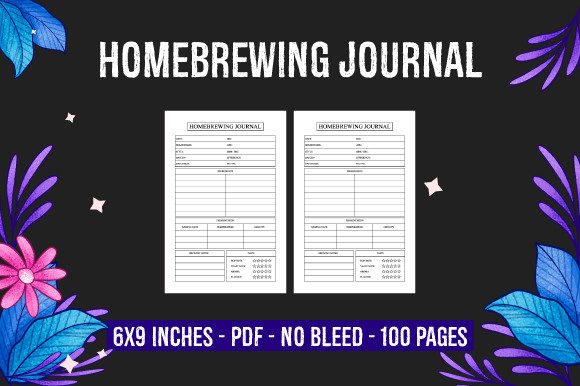
A beautifully designed interior fails if it does not match the actual workflow of homebrewing. Many ready-to-use templates suffer from being too rigid or too vague. A common mistake is providing lined pages without structured prompts. While open space offers flexibility, beginners often do not know what data points are critical to track. Conversely, overly complex layouts with dozens of tiny boxes can overwhelm users who brew casually. The best approach for a 100-page KDP interior is a balanced hybrid layout. Ensure the PDF includes dedicated sections for batch information, ingredient lists, process logs, and sensory evaluation, but leave enough white space for personal notes or unexpected observations.
Creators should also avoid the trap of assuming one size fits all within the brewing community. Different styles require different tracking priorities. A lager brewer needs extensive temperature logging over weeks, while a sour beer enthusiast might focus more on pH changes and aging duration. If your ready-to-use file only caters to standard ale production, you limit your market. Review the interior pages critically: Are there fields for water chemistry? Is there space for carbonation levels? Does the tasting section include aroma and mouthfeel descriptors? Addressing these nuances transforms a generic notebook into a valuable Homebrewing Journal that customers will repurchase for every new batch.
Technical Checks Before Publishing
Before you add a cover and hit publish, conduct a thorough technical audit of your digital files. Start by confirming the exact page count matches your KDP setup. A file labeled as 100 pages must contain exactly 100 pages; even a single blank extra page can cause upload errors or spine miscalculations. Verify the color profile as well. Most KDP interiors for journals are black and white, so ensure your PDF is set to grayscale or CMYK black to avoid unexpected color printing costs or rendering issues. RGB colors may look vibrant on screen but can print muddy or be rejected by the automated review system.
Additionally, test the usability of the digital file yourself. Print a few sample pages at actual size on your home printer. Write in them with the types of pens brewers commonly use, such as ballpoints or waterproof markers. Check if the paper texture implied by the design interferes with writing, or if the contrast is too low to read comfortably. This hands-on testing reveals practical flaws that digital inspection misses. If the lines are too faint or the spacing too tight, adjust the file before listing it. This proactive step prevents customer dissatisfaction and returns, protecting your seller metrics and reputation.
Enhancing Presentation and Market Fit
While the interior drives repeat purchases, the cover attracts the initial sale. However, a disconnect between cover aesthetics and interior functionality creates cognitive dissonance. If your cover suggests a rustic, vintage brewery vibe but the interior features ultra-modern, minimalist charts, customers may feel misled. Align your design language across both elements. Furthermore, consider how the 6″ x 9″ format influences cover design. Text and imagery must remain legible at thumbnail size on Amazon. Avoid cluttering the front cover with excessive text; let the title "Homebrewing Journal" and a clear visual cue communicate the purpose instantly.
Finally, remember that transparency builds trust. Clearly state what is included in your product description. Specify the dimensions, page count, bleed status, and file format. If the interior is tailored for a specific type of brewing or experience level, mention it. Honest descriptions reduce pre-purchase anxiety and post-purchase disappointment. By approaching your KDP business with the same meticulous attention to detail that brewers apply to their craft, you create products that genuinely serve the community. This alignment of quality, utility, and honesty is what separates successful POD ventures from fleeting trends in the competitive world of niche publishing.