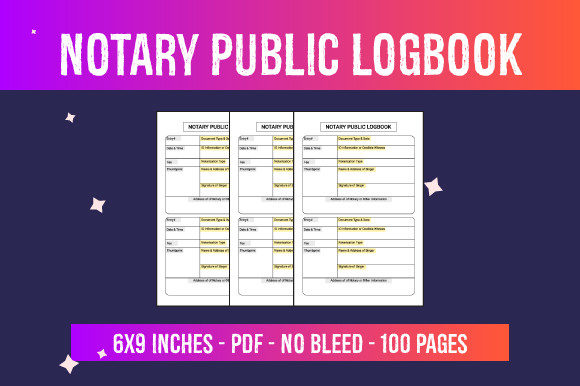
Evaluating Notary Public Logbook Interiors for KDP Publishing
A Notary Public Logbook serves as the official record-keeping journal for commissioned notaries, documenting essential details of every notarization performed. For entrepreneurs and self-publishers operating within the Amazon Kindle Direct Publishing (KDP) or Print on Demand (POD) ecosystem, this specific niche represents a functional product category rather than a creative writing endeavor. When evaluating ready-to-use PDF files for these journals, specifically those offering 100-page interiors in a 6″ x 9″ format without bleed, the decision-making process should focus on compliance, utility, and market viability. Understanding the technical specifications and practical applications of these digital assets is necessary to determine if they align with your publishing business goals.
Understanding the Function of a Notary Journal
Before assessing the commercial value of a pre-formatted interior, it is important to understand what the end user requires. A Notary Public Logbook is not merely a notebook; it is a legal safeguard. State laws vary significantly regarding what information must be recorded in a notarial journal. Generally, these logs capture the date and time of the act, the type of notarization, the document description, the signer’s name and address, identification method used, and fees charged. Some jurisdictions also require thumbprints or additional witness information.
For a KDP publisher, this means the interior design must be accurate and compliant. A generic lined notebook does not serve this audience. The value proposition of a dedicated Notary Public Logbook interior lies in its structured columns and headers that guide the notary through proper documentation. When reviewing a 100-page PDF asset, verify that the column widths are appropriate for handwriting and that the headers correspond to standard notarial requirements across multiple states, or specify which state the journal is designed for if it is region-specific.
Technical Specifications and Format Evaluation
The specific digital file described includes distinct parameters that influence both the printing quality and the user experience. Evaluating these specifications helps determine if the product fits current market standards.
- Dimensions (6″ x 9″): This trim size is considered the industry standard for portable professional journals. It offers sufficient surface area for tabular data entry while remaining compact enough to fit in a briefcase or glove compartment. Larger formats like 8.5″ x 11″ provide more writing space but reduce portability, while smaller sizes often lack the width necessary for multi-column log entries. The 6″ x 9″ dimension strikes a balance that generally appeals to mobile notaries and office-based professionals alike.
- Page Count (100 Pages): A 100-page count creates a spine width that allows for legible title text, which is crucial for shelf visibility and organization. From a usage perspective, 100 pages typically accommodate several months of moderate notarial activity. This volume prevents the book from becoming too bulky or heavy, which can increase printing costs and shipping times, while still providing perceived value to the buyer.
- No Bleed Configuration: Selecting a "no bleed" option means all content is contained within safe margins, with no elements extending to the edge of the page. For tabular logbooks, this is often the superior choice. Tables and lines that extend to the trim line risk being cropped during the binding process, potentially rendering entry rows unusable. No-bleed interiors ensure consistent white space and protect the integrity of the recording fields, reducing the likelihood of customer returns due to printing errors.
- High-Resolution PDF Files: Clarity is non-negotiable for functional books. Low-resolution files result in pixelated lines and fuzzy text, making the journal difficult to use and unprofessional in appearance. High-resolution vectors ensure crisp table borders and sharp typography, which is essential when users are filling out legal documents by hand.
Benefits of Ready-to-Use Interiors for Publishers
Utilizing pre-made PDF interiors offers significant operational advantages for POD businesses. The primary benefit is time efficiency. Designing a compliant, well-spaced notary journal from scratch requires knowledge of notarial law and proficiency in layout software. A ready-to-use file eliminates the research and design phase, allowing publishers to focus on cover creation, keyword optimization, and marketing.
Furthermore, standardized interiors reduce the risk of formatting rejection by KDP. Automated review systems frequently flag manuscripts with margin violations or low-quality images. Professionally prepared 6″ x 9″ no-bleed templates are typically pre-validated against these technical constraints. This streamlines the publishing workflow and allows for faster iteration. If one cover design underperforms, the publisher can quickly test new aesthetics using the same reliable interior file, isolating variables to improve sales performance.
Tradeoffs and Considerations
While convenient, ready-to-use interiors present specific challenges that must be weighed against their benefits. The most significant tradeoff is market saturation. Because these files are accessible to many publishers, identical interiors may appear across numerous listings. This commoditization places immense pressure on cover design and metadata differentiation. If the interior is indistinguishable from competitors, the purchase decision relies entirely on external branding and price.
Another consideration is customization limitations. Pre-made files are static. If you identify a gap in the market—such as a need for a specific state-mandated disclaimer or an extra column for digital certificates—you cannot modify a flattened PDF without recreating the entire document. Publishers must decide whether the speed of using a stock interior outweighs the potential competitive advantage of a custom-designed layout tailored to underserved niches.
Additionally, reliance on third-party interiors requires trust in the creator’s accuracy. Notary laws change periodically. A PDF created three years ago may contain outdated terminology or miss newly required fields. Due diligence is necessary to ensure the template remains current. Publishing an obsolete logbook can lead to negative reviews and damage seller reputation, as notaries cannot risk using non-compliant journals.
Determining Fit: When to Use vs. When to Seek Alternatives
This type of digital asset is a strong fit for publishers who are new to the low-content niche or those looking to diversify their catalog quickly without extensive design skills. It is particularly suitable for sellers who excel at cover design and SEO but lack the technical ability to create complex tables. If your business model relies on volume and testing multiple niches, a standardized 100-page Notary Public Logbook interior provides a stable foundation for experimentation.
Conversely, alternatives may be worth considering if your goal is to build a premium brand or target a highly specific jurisdiction. Publishers focusing exclusively on California or Texas notaries, for example, may find better success creating custom interiors that include state-specific statutory language directly on the pages. Similarly, if you aim to differentiate through unique features like duplicate carbon copy layouts, integrated reference guides, or specialized indexing systems, a generic ready-to-use PDF will likely be insufficient. In these cases, investing in custom design or hiring a specialist to create proprietary interiors may yield better long-term returns despite the higher upfront effort.
Practical Decision-Making Insights
When evaluating whether to proceed with this specific Notary Public Logbook interior, conduct a competitive analysis of existing top-selling journals in the 6″ x 9″ category. Examine their "Look Inside" previews to compare column structures and header clarity against the PDF you are considering. If the ready-to-use file matches or exceeds the usability of current bestsellers, it validates the asset's market readiness.
Consider the licensing terms carefully. Ensure the license permits commercial use on KDP and clarifies whether the file can be used "as-is" or requires modification. Some licenses prohibit uploading the exact same interior to multiple accounts or require significant alteration to claim copyright. Understanding these legal boundaries protects your publishing account from suspension.
Finally, assess the alignment between the interior’s capacity and your pricing strategy. A 100-page no-bleed journal has a fixed printing cost. Calculate your royalty margin at various price points to ensure profitability. If the standard interior forces a price point that is uncompetitive compared to higher-page-count alternatives, the asset may not be viable regardless of its quality. Successful integration of ready-to-use files requires balancing production convenience with economic reality and genuine user needs.