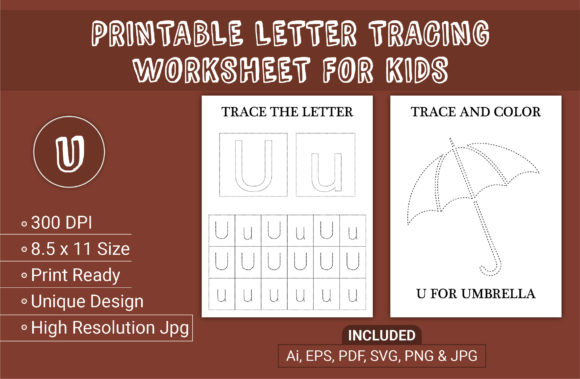
Evaluating Letter Tracing and Coloring Workbook SVG Files for KDP and Home Use
Selecting the right interior assets for a children’s activity book requires balancing technical precision with developmental appropriateness. For creators targeting toddlers, preschoolers, and early learners aged three to five, the Letter Tracing and Coloring Workbook SVG represents a specific category of digital asset designed for versatility. Unlike standard raster images or pre-formatted PDFs, SVG (Scalable Vector Graphics) files offer mathematical precision that remains crisp at any size. This distinction is critical when producing materials where line quality directly impacts a child's ability to practice handwriting effectively.
When comparing resources for Amazon KDP businesses or home education, understanding the functional differences between vector-based interiors and alternative formats helps in making an informed decision. The choice often comes down to customization needs, print quality requirements, and long-term asset utility. While many pre-made PDF interiors exist, the inclusion of source files like AI, EPS, and SVG changes the value proposition significantly for those who intend to modify, brand, or repurpose content over time.
Technical Distinctions: Vector vs. Raster Interiors
The primary differentiator of a Letter Tracing and Coloring Workbook SVG is its underlying architecture. Raster formats, such as standard JPG or PNG files, rely on a fixed grid of pixels. When these are resized or printed at high resolutions, edges can become blurry or pixelated. For adult coloring books, this may be acceptable, but for early childhood handwriting practice, line clarity is non-negotiable. Toddlers and preschoolers require distinct, high-contrast boundaries to guide their motor skills. Fuzzy lines create visual confusion and can hinder the development of proper letter formation.
Vector files define shapes through mathematical paths rather than pixels. This ensures that whether the design is scaled for a pocket-sized booklet or a large-format workbook, the lines remain perfectly sharp. In the context of KDP, this translates to professional-grade output at 300 DPI without the risk of compression artifacts. When evaluating products, verify that the "SVG" claim refers to true vector paths rather than embedded raster images within an SVG container. True vectors allow for stroke width adjustments, color changes, and element separation, which are impossible with flattened image files.
Comparing Customization Capabilities
For KDP publishers, the ability to differentiate a product in a saturated market is essential. Pre-formatted PDF interiors offer speed but limit uniqueness. If ten other sellers use the same static PDF, the only variable becomes the cover design. A Letter Tracing and Coloring Workbook SVG package typically includes editable source files (AI, EPS), enabling deeper customization.
- Font Integration: Vectors allow you to swap generic tracing fonts for proprietary or licensed typefaces that match your brand identity.
- Layout Flexibility: Elements can be rearranged to create unique page compositions, preventing duplicate content flags on Amazon.
- Branding Consistency: Headers, footers, and decorative elements can be modified to align with a specific series or niche aesthetic.
- Adaptability: The same asset can be resized for different trim sizes (e.g., adapting from 8.5 x 11 to A4) without losing quality or requiring redrawing.
Conversely, if you lack access to Adobe Illustrator or similar vector editing software, the SVG/AI/EPS files may have limited immediate utility. In such cases, the included print-ready PDF serves as the primary deliverable. Buyers must honestly assess their technical workflow: if you cannot edit vectors, prioritize the quality of the pre-set PDF over the potential of the source files.
Developmental Suitability for Ages Three to Five
Technical quality must serve pedagogical goals. Resources for this age group differ significantly from those for older children. When reviewing a letter tracing and coloring workbook for kids printable assets, evaluate the design against specific developmental milestones for three, four, and five-year-olds.
Line Weight and Contrast: Younger children (ages 3-4) generally benefit from thicker tracing lines and larger letterforms. Fine motor control is still emerging, and overly thin guidelines can be frustrating. High-quality vector interiors allow for global adjustment of stroke weights, enabling creators to tailor difficulty levels. A static PDF locks you into one difficulty setting, whereas vector assets support the creation of progressive difficulty tiers within a single series.
Cognitive Load and Visual Clarity: Effective worksheets for this demographic avoid visual clutter. Crystal clear lines are not just an aesthetic preference; they reduce cognitive load, allowing the child to focus solely on the motor task. When comparing options, look for designs that balance engaging coloring elements with ample white space. Overly intricate mandalas or dense backgrounds, while visually appealing to adults, can distract preschoolers from the primary learning objective of letter recognition and formation.
Evaluating File Deliverables and Workflow Fit
A comprehensive asset package usually contains multiple file types, each serving a distinct purpose in the production pipeline. Understanding when to use each format prevents workflow bottlenecks.
- Print-Ready PDF: The final output for KDP upload. Ensure it is flattened, embedded with fonts, and set to the correct bleed and margin specifications (typically 8.5 x 11 for standard workbooks).
- SVG / AI / EPS: Master files for editing. Use these to create new variations, fix errors, or extract individual elements for marketing materials or social media previews.
- High-Resolution JPG/PNG: Useful for creating mockups, listing images, or digital downloads where vector compatibility is not required. Note that preview images are often excluded from commercial asset packs, necessitating the creation of your own marketing visuals using these files.
For users focused exclusively on home use or classroom printing, the high-resolution JPG or PDF may be sufficient. However, for business owners building a long-term catalog, the master files represent the true asset value. They future-proof your purchase against platform changes, font licensing updates, or rebranding initiatives.
Tradeoffs and Decision Factors
No single resource fits every scenario. While Letter Tracing and Coloring Workbook SVG files offer superior flexibility, they come with tradeoffs compared to simpler alternatives.
Learning Curve: Editing vector files requires proficiency with design software. If you are new to KDP or lack design skills, the time investment to learn Illustrator may outweigh the benefits of customization. In this case, a well-designed, unique PDF interior might be a more practical starting point.
File Complexity: Some vector files are poorly constructed, with excessive anchor points or grouped layers that make editing difficult. Always test a sample file before committing to a full purchase. Clean, organized layer structures save hours of production time.
Cost vs. Utility: Vector packages often command higher prices than static PDFs. Evaluate whether the premium is justified by your intended volume and differentiation strategy. If you plan to produce only one title, a PDF may suffice. If you are building a brand ecosystem across multiple age groups and themes, the per-unit cost of vector assets decreases significantly through reuse and adaptation.
When to Choose Alternative Formats
There are specific situations where a Letter Tracing and Coloring Workbook SVG may not be the optimal choice:
- Rapid Testing: If you are validating a new niche and need to publish within 24 hours, pre-formatted PDFs eliminate the editing phase.
- Non-Commercial Personal Use: Parents printing worksheets at home rarely need vector editability. A clean, printable PDF or JPG is more user-friendly for standard home printers.
- Complex Illustrations: If the workbook relies heavily on photorealistic or painterly artwork rather than line art, raster formats may actually be more appropriate than vectors.
Making an Informed Selection
Ultimately, the decision hinges on aligning technical specifications with your specific goals. For KDP entrepreneurs, the Letter Tracing and Coloring Workbook SVG offers a strategic advantage through customization and quality assurance. The inclusion of 300 DPI print-ready files alongside editable masters supports both immediate publishing needs and long-term brand development. For educators and parents, the same attributes ensure that printed materials are developmentally appropriate and visually accessible for young learners.
When evaluating any digital interior, prioritize verified technical specs over marketing claims. Confirm dimensions (8.5 x 11), resolution (300 DPI), and file integrity. Check that the design style matches the cognitive and motor capabilities of three to five-year-olds. Whether you choose a vector-based solution or a static alternative, the goal remains consistent: providing clear, engaging, and effective handwriting practice that supports early childhood development. By focusing on these practical factors rather than hype, you can select resources that deliver genuine value for your business or educational objectives.